
How to Prepare and Send 1099-Ks for Your School

| Time to Read | ~12-15 minutes |
| What You'll Learn |
|
| Next Steps |
|
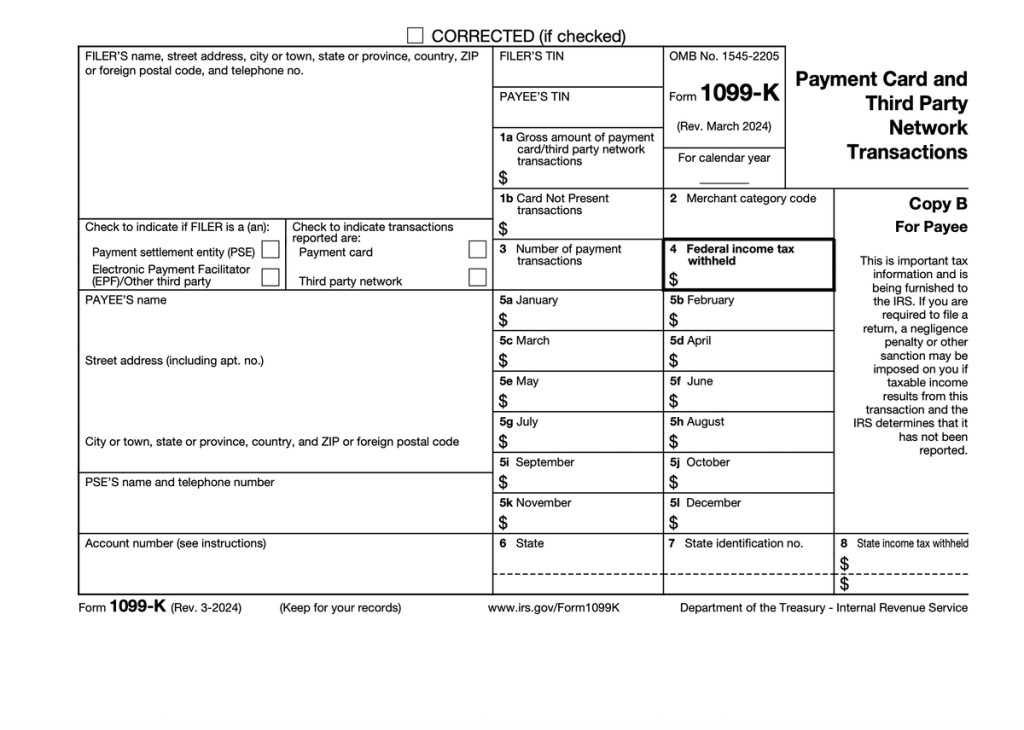
Form 1099-K is a tax form that reports the total payments your PTA received from cards and online platforms during the year. You don't actually need to fill it out yourself (that's your payment processor's job) but you do need to check it for accuracy and make sure it ties to your records when you file certain other forms at tax time.
This guide walks you through who actually files Form 1099-K and what each part of the form means. We'll also show you how to reconcile it with your bank activity and FutureFund payouts, with tips on using our accounting platform for schools to keep tax season from turning into a guessing game.
Understanding who actually files Form 1099-K
The IRS uses Form 1099-K to track payments processed by cards and online platforms like FutureFund. It shows the gross amount of payments that flowed through those systems to your PTA over the calendar year.
In other words: if you use FutureFund to raise money for your school, they'll file Form 1099-K and send you a copy.
As the payee, your PTA won't fill out or submit Form 1099-K. But you still need to know how to cross-check it against your own records when you complete Form 990-N, 990-EZ, or 990. Tax-exempt organizations like PTAs must fill out these forms to meet their annual reporting requirements.
Not every PTA gets a 1099-K (but you probably want one)
Organizations only receive a 1099-K when they raise a certain amount of money from cards or platforms in a given year. As of this writing, that federal minimum threshold is met when all of the following apply:
- You raised more than $20,000
- You raised it with more than 200 transactions
- You raised it on a single platform
Different states have different rules, so you might receive a 1099-K even if you didn't check all of those boxes. But the point is, you want your PTA to get a 1099-K. It's usually a good sign that you raised a lot of money this year.
If you raised a lot from different sources, you might even get more than one!
What to do once your PTA receives a 1099-K
Think of the 1099-K as a big "total" from an outside source that needs to make sense alongside your own books. Here's how to work through it, step by step, without getting buried.
Step 1: Gather your paperwork and logins
Before you look at a single box:
-
Collect all your 1099-Ks
- Check your PTA mailbox and shared email addresses.
- Download any digital copies from your payment processor's tax or documents section.
-
Pull your platform reports
- From FutureFund (or any other fundraising platform you use), export a calendar-year report with:
- All transactions
- Fees
- Refunds and chargebacks
- From FutureFund (or any other fundraising platform you use), export a calendar-year report with:
-
Open your accounting records
- If you use Beekeeper, make sure Automatic Bank Imports are up to date so all processor deposits and fees are in one place. If you do this, you can skip step 2 above.
- Filter to the same calendar year as the 1099-K.
-
Have your prior return handy
- Grab last year's Form 990-N/990-EZ/990 so you can see how your income categories were reported.
Step 2: Check the top of the form
Start with the basic "who is who" information. This part is simple but important.
Filer's name and contact info (top left)
This should be the payment processor or platform that handled your online payments. If you used FutureFund, that's what it should say.
If the name doesn't look familiar, log into FutureFund (or your other platform) and confirm who they use behind the scenes. The filer is who you'll contact if anything looks wrong.
Payee's name, address, and TIN (top right)
Make sure this matches your PTA's information exactly:
- Legal name (don't say "Lincoln PTA" if your PTA's legal name is "Lincoln Elementary School Parent Teacher Association, Inc.")
- Mailing address
- EIN (the last four digits shown on the form)
If the form shows:
- The school district's EIN,
- A volunteer's SSN, or
- An old PTA name/EIN you no longer use,
Then make a note. That's something you'll need to fix in a later step.
Tax year and account number
Confirm that the tax year on the form matches the calendar year you're working on.
If there's an account number field filled in, that usually just identifies a specific merchant account on the processor's side. You don't need to do anything with it; just note it if you have multiple accounts.
Step 3: Walk through the key boxes, one by one
Now for the part that feels intimidating at first glance. Don't worry; we'll keep it straightforward.
Box 1a: Gross amount of payments
This is the big one: the total dollar amount of all reportable payments processed for your PTA that year. It's the sum of everything that ran through the processor (donations, spirit wear, event registrations, and more). It is not reduced for:
- Processing fees
- Refunds or chargebacks
- Discounts or coupons
- Shipping or sales tax
What you do:
- In your platform report, total the gross payments for the calendar year.
- In your accounting records (or Beekeeper), add up:
- Net deposits from that processor
- Any fees
- Any refunds/chargebacks
Those pieces together should get you very close to the Box 1a amount, although there might be small timing differences.
If you're using Beekeeper, Account Reconciliation helps you match each deposit and fee so you're not doing this by hand.
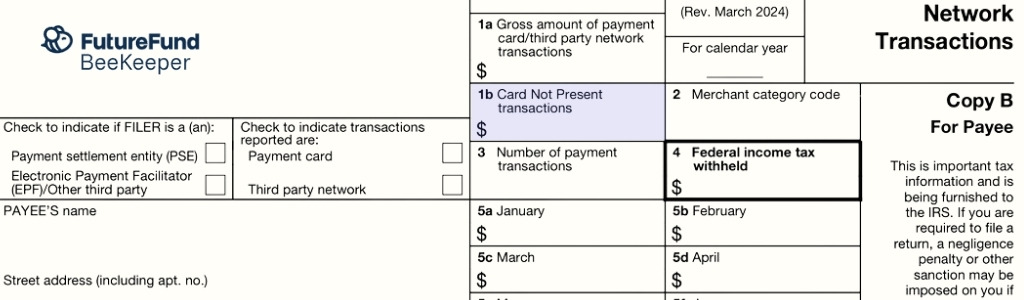
Box 1b: Card-not-present transactions (if shown)
Some forms show a separate box for card-not-present transactions (typically online payments).
For PTAs fundraising with FutureFund, this number will usually be pretty close to Box 1a, because most of the money your PTA has raised this year will probably have been online. But if you also made a lot of card sales at in-person events using PoS apps like Snackbar, it could be different.
You don't need to do anything special with this for your 990; it's mainly just a detail about how those payments were processed.
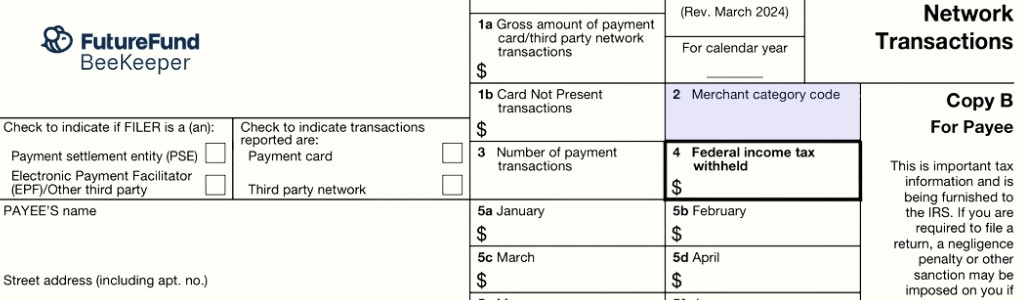
Box 2: Merchant category code (MCC)
This is a four-digit code describing the type of organization you are. You don't control it directly, but it will normally be one of the following:
- 8398: Charitable or Social Service Organizations
- 8641: Associations / Civic / Membership Organizations
- 8299: Schools / Educational Services
- 5942: Book Stores (sometimes used if your processor classifies spirit wear or book fair sales oddly)
If it's a different number, then make a note when you contact the filer. But don't panic! It's not used to calculate your tax; it's more of a classification flag.

Box 3: Number of payment transactions
This is how many individual payments your processor counted toward Box 1a.
Quick checks you can do:
- Compare it to the number of transactions in your platform report.
- Make sure it feels right for the year (a PTA doing three large fundraisers might see hundreds or thousands of transactions, not a dozen).
If the count is dramatically different from what your reports show, add it to your "ask the processor" list.
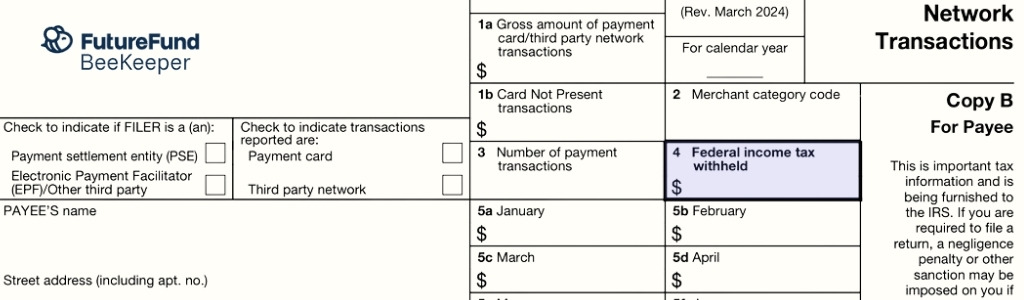
Box 4: Federal income tax withheld
For PTAs, this should almost always be blank or zero. Box 4 is typically only used when your payment processor had to withhold federal income tax.
If you see an amount here and you weren't expecting it, contact the filer right away to find out why. It might be an error.
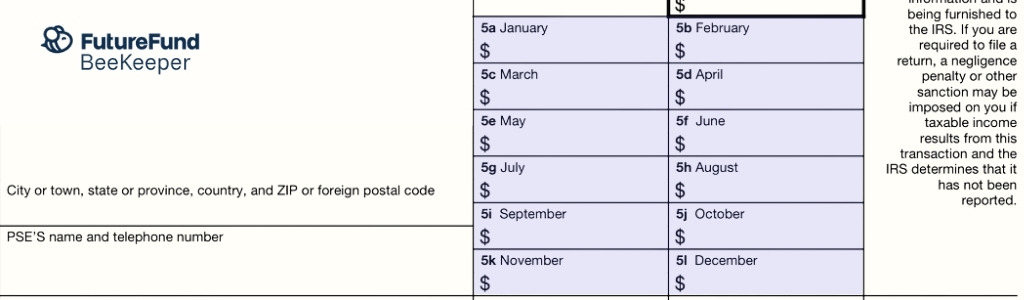
Boxes 5a-5l: Monthly breakdown
These boxes break the gross amount in Box 1a into monthly totals (January through December).
Here's how to use them:
- In your platform report, run monthly totals for the same year.
- Look for obvious matches:
- Did your fun run happen in October? Then Box 5j (October) should be one of the largest months.
- Did you run a big spirit wear sale in September? Box 5i (September) should reflect that.
- Confirm that if you add up 5a-5l, you land very close to Box 1a (small rounding differences are normal).
If you're tracking fundraisers in a budget tool, Beekeeper's Budget Tracking can help you line these months up with what you expected to raise.
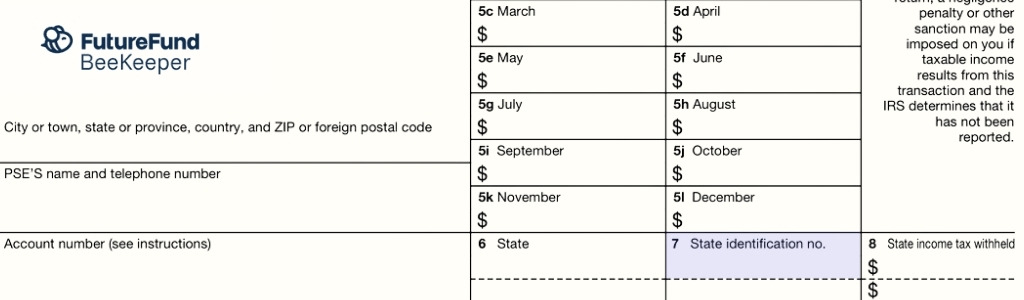
State boxes: state ID and state tax withheld
Near the bottom, you may see boxes for:
- State identification number
- State income tax withheld
Most PTAs will see no state withholding here.
The presence of state information usually just means you're in a state that wants a copy of the 1099-K or has a lower threshold than the federal $20,000/200 rule.
If you're unsure, this is a good moment to ask your state PTA or local CPA whether there's anything else you need to file with the state.
Step 4: Fix obvious issues (or at least document them)
While you're going through the form, you might find problems. The IRS has clear instructions on what to do if this happens.
Common ones:
1. Your form shows the wrong name or TIN
Example: the 1099-K is in a volunteer's name instead of the PTA.
- Call or email the filer (the company listed at the top left).
- Explain the error and provide the correct legal name and EIN.
- Ask for a corrected 1099-K.
- Keep a copy of the original form and any emails or tickets about the correction.
2. The gross amount clearly doesn't match your records
Double-check your platform report for:
- Refunds that might still be included in gross
- Duplicate transactions
- Activity from a previous or future year
If you still can't make it line up, contact the filer with specific examples and ask them to review.
3. You received a 1099-K that really shouldn't be yours
Maybe it reports personal reimbursements or a test account that was never used.
- Again, contact the filer, explain, and request a corrected form.
- Don't ignore it! Hang on to the 1099-K and your notes in case questions come up later.
If you can't get a corrected form before your filing deadline, the IRS says you should still file your return using your best records. You should also work with a tax professional on how to handle the mismatch on Schedule 1 or other schedules if needed.
Step 5: Use the 1099-K to support your Form 990-N, 990-EZ, or 990
The 1099-K itself doesn't decide whether your income is taxable. Most PTA funds (like donations, dues, and revenue from most fundraisers) are still tax-exempt. The form is just one more tool to make sure what you report to the IRS matches what your processors report.
You won't copy numbers directly from the 1099-K onto your Form 990, but the form is still an important cross-check. Here's how having it helps you when you fill out that form:
It helps confirm your online fundraising totals
Box 1a shows the processor's version of how much money came in through cards and online payments. You'll compare it to the totals in your own books to make sure nothing is missing or duplicated.
If you use Beekeeper, Automatic Bank Imports and Account Reconciliation make it much easier to match those deposits and fees to what actually came in.
It helps you spot the right income categories
The 1099-K doesn't break income into categories, but it does give you the total online amount that needs to be accounted for in your books. If your internal categories (donations, spirit wear, event revenue, etc.) don't add up to the 1099-K's gross total, that tells you something is missing, miscoded, or needs review.
Budget Tracking in Beekeeper can help you separate fundraisers, donations, and program revenue so you're not trying to untangle everything at tax time.
It serves as backup documentation
You don't submit the 1099-K with your Form 990, but it's helpful support. If questions ever come up later, having the form and your reconciliation notes makes it clear how you arrived at your total revenue.
Keeping your transactions organized in Beekeeper makes it easy to store everything in one place for future treasurers.
One last note from the BeeKeeper team
This guide is meant to give PTA treasurers a clear, practical path through a confusing form, but we're not here to replace a tax professional. Tax rules can change, and your state or district may have extra requirements for school organizations.
But if you can:
- Recognize who actually files Form 1099-K
- Read each key box with confidence
- Reconcile the totals to your own records (with help from tools like FutureFund and Beekeeper)
... then you've done most of the hard work already. The form stops being scary, and it becomes what it was always meant to be: just another piece of backup for the good work your PTA is already doing.
Cameron Martel is FutureFunds' chief marketing officer. He focuses on helping FutureFunders get more from their fundraising, helping their online stores reach more customers, and generally empowering the people that are building the next generation of students.